


BUBBA Fishing
4.555.00 Reviews
App Specs
- Version
- 2.2.13
- Updated On
- License
- Free
- Downloads
- 10,000+
- Developer
- AOB Products Company
- Categories
- Sports
- Platform
- Android
Screenshots
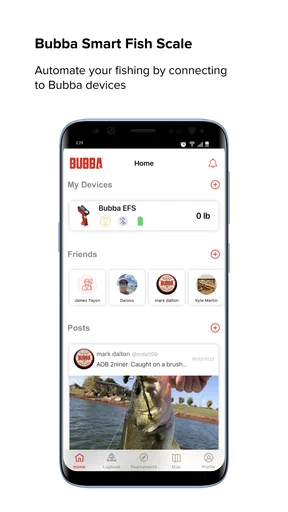
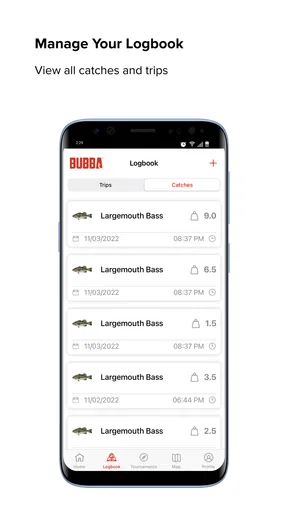
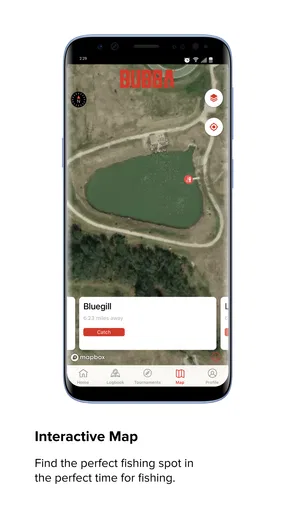
 Analysis by AppCompare
I approached BUBBA Fishing as a practical companion for time on the water rather than as a general-purpose sports app. Its focus is narrow, which is a strength when you want fishing-related information in one place, but it also means the experience depends heavily on what you expect from a fishing tool. I found it most appealing for people who already enjoy fishing and want a dedicated mobile reference, not for someone looking for a broad outdoor planner or a social sports platform.
The app comes from AOB Products Company and is free to install, with optional in-app purchases ranging from $4.99 to $49.99 per item. It is rated for Everyone, runs on Android 8.0 and later, and the current version is 2.2.13. Those details make it reasonably approachable for households that share devices or for anglers who do not use the newest phone. Its average rating sits at 4.5 from around 492 ratings, while the app has passed 10 thousand installs, so it has a modest but visible user base rather than the reach of a mainstream sports service.
How readable navigation affects a fishing trip
My first impression was that the app makes more sense when I use it with a clear purpose. Fishing apps can become frustrating when they bury useful material under too many menus, especially when I am standing outside, dealing with glare, wind, wet hands, or limited attention. BUBBA Fishing works best when I decide before opening it what I am trying to do: prepare for a trip, check fishing-related material, or use it as a dedicated reference instead of browsing aimlessly.
That distinction matters for readability. A fishing application should not require the same concentration as a long article or a complicated planning tool. I found short, focused sessions more comfortable than trying to explore every part of the product at once. If you are introducing it to a less confident phone user, I would recommend opening it at home first, learning the main navigation, and saving the steps you expect to use outdoors. That small preparation can make the difference between a useful companion and an app that stays unopened in a pocket.
The store presents it as “The Ultimate Fishing App,” but I would interpret that as a clear statement of purpose rather than a promise that it replaces every fishing resource. It is better viewed as a specialist app from a fishing brand. The experience feels more suitable for someone who wants fishing content gathered around one identity than for a user who needs detailed mapping, live conditions, or a full trip-management system.
One practical habit helped me judge it fairly: I separated discovery from use. At home, I could take time to browse and understand what the app offers. At the water, I would avoid experimenting with unfamiliar sections and go straight to the material I had already identified. This two-stage workflow is especially useful for users with attention difficulties, reduced visual comfort, or anyone who finds fast outdoor decision-making tiring.
Who benefits from the dedicated format
BUBBA Fishing is a natural fit for recreational anglers, beginners building confidence, and experienced users who enjoy having a fishing-focused product instead of a generic sports feed. It also makes sense for someone buying or receiving fishing equipment associated with the BUBBA name and wanting a related digital experience. The free entry point lowers the risk of trying it, although the presence of paid items means I would still check what is included before committing to an upgrade.
Worth Reading Before You Choose

Switching to Android Auto Means Rethinking Your Driving Routine

Google Calendar Makes a Crowded Week Easier to Manage

Baby Panda World Brings Quick Play to Modern Phones, but Its Game Library Feels Busy

ESPN’s Live Game View Makes Following Close Games Easier

QuizzLand Review: A Good Fit for Short Trivia Breaks, Not Every Player

Basketball Stars: Multiplayer Is Fast, but Can It Recover When Matches Go Wrong?
I would be more cautious about recommending it to a person whose main requirement is precise navigation, detailed waterway mapping, or intensive catch record management. Those users may be happier with a dedicated mapping or logbook application. BUBBA Fishing can sit beside such tools, but I would not automatically treat it as a replacement for them.
Motor, sensory, and cognitive considerations outdoors
Fishing creates unusual interaction problems. I may be holding a rod, wearing gloves, standing on uneven ground, or trying not to drop a phone near water. That makes one-handed use and short interactions more important than they would be on a sofa. My advice is to keep the app work simple while fishing: use it for quick reference rather than extended typing or repeated navigation.
For users with limited dexterity, the most important question is not simply whether the app opens, but whether the whole workflow can be completed without constant precision. A phone stand, a protective case, voice control provided by the operating system, or a larger device can make outdoor use easier. These are practical adaptations rather than features I would attribute directly to the app. I would test them before a full-day trip, because wet fingers and bright conditions expose problems that are easy to miss indoors.
Visual comfort also changes outside. Reflections can make text and controls harder to distinguish, while changing brightness can cause eye strain. I found it sensible to review important material before leaving and to avoid depending on the screen for long reading sessions beside the water. If you have low vision, color sensitivity, or difficulty with small controls, the safest approach is to test the exact phone and display settings you intend to use. System-level text enlargement or contrast options may help, but their effect can vary by screen and operating system.
There is a useful cognitive advantage in keeping a fishing app separate from unrelated notifications and entertainment. When I open a focused tool, I am less likely to drift into unrelated tasks. At the same time, a narrow purpose can become a limitation if the app does not match the immediate question. Someone who needs weather, route planning, regulations, and personal records may end up switching between several apps, which increases mental load for users who prefer one predictable workflow.
For anglers with hearing loss, the app’s usefulness should not depend on audio alone, but I would still plan around visual confirmation and written information. I would not assume that every important interaction is suitable for someone who cannot hear alerts or spoken guidance. Checking the app in a quiet indoor setting first is a sensible way to learn whether its information is presented in a form you can comfortably follow.
A realistic weekend use case
Imagine planning a Saturday morning trip with a friend who has mild hand tremors and finds small text tiring. I would explore BUBBA Fishing the evening before, identify the sections that matter, and avoid making that person search while standing in the sun. We could enlarge the phone’s text where possible, place the device on a stable surface, and agree that one person handles navigation while the other fishes. This is not a workaround that makes every barrier disappear, but it turns the app into a manageable part of the outing rather than another task competing for attention.
For a beginner, I would use the same preparation method but add a short learning session. Instead of handing over the phone at the shoreline and saying “look around,” I would explain what the app is for and what it is not for. That prevents disappointment if the user expects a complete fishing command center. It also helps someone who feels overwhelmed by unfamiliar sports terminology or too many choices.
Access changes with location, weather, and device conditions
Situational access is where a fishing app is judged most honestly. At home, BUBBA Fishing is easier to explore because I can sit comfortably, charge the phone, and concentrate. Outdoors, access depends on sunlight, battery life, connectivity, temperature, clothing, and whether the device can be kept dry. The app may be perfectly usable in one setting and inconvenient in another without anything about the software changing.
I would therefore avoid making it the only source of information for a remote outing. Before leaving, I would review anything essential and keep a non-digital backup for details that could affect the trip. This is particularly important for users who cannot easily troubleshoot a phone in the field. The app is most helpful as part of a preparation routine, not as the sole plan when conditions are unpredictable.
Connectivity is another reason to prepare early. I would not assume that every part of a fishing application will behave identically without a reliable connection. If a section matters to your trip, open it before leaving and learn whether the material remains available when you are away from a strong signal. That simple check answers a more useful question than a general promise of convenience: can this particular workflow survive the place where I intend to use it?
Battery management matters too. Outdoor users may already be running navigation, taking photographs, or using a phone for emergency contact. I would charge the device fully, reduce unnecessary background activity, and consider carrying a power bank. This advice is not unique to fishing, but the consequences of a dead phone are more serious when the water is far from home or when a user relies on the device for communication.
Shared use can make the app more inclusive. A family can explore it together, allowing one person to read while another handles the physical equipment. That arrangement works well for children, older adults, and users who find phone interaction tiring. Because the age rating is Everyone, it is also easier to consider in mixed-age settings, although supervision and real-world water safety remain more important than any app.
Where another tool may be the better choice
If your priority is a visual map with routes, access points, or location tracking, I would start with a mapping-focused fishing service. If you want a structured diary of catches, a logbook app is likely to provide a clearer long-term record. If you are mainly looking for weather and water conditions, a specialized forecast tool may answer that need faster. BUBBA Fishing makes more sense when you value a branded fishing environment and supporting content, or when you want to complement those specialist tools rather than replace them.
This is also where the optional purchases deserve attention. The free installation is a useful way to judge the basic experience, but I would not buy anything simply because the app is fishing-focused. First identify the exact problem you want solved, then check whether the relevant paid item addresses it. The available purchase range extends from $4.99 to $49.99 per item, so the difference between casually trying the app and making a substantial purchase is meaningful.
Remaining barriers that affect everyday use
The biggest barrier is expectation management. A short store description can make a specialist app sound like a complete solution, while real anglers often need several separate tools. BUBBA Fishing is easier to appreciate when I treat it as one part of a fishing routine. Users who want one app to handle every planning, navigation, learning, and recording task may find the boundaries frustrating.
Another barrier is the outdoor environment itself. Small screens, glare, rain, cold fingers, and unstable footing can turn ordinary taps into mistakes. I would not recommend extended browsing while moving around a boat, crossing rocks, or handling tackle. Stop somewhere stable, dry the screen, and use the app deliberately. That advice may sound obvious, but it is central to making a phone-based fishing experience accessible and safe.
There is also a social barrier for people who do not already understand fishing vocabulary or brand culture. A newcomer may need context that an experienced angler takes for granted. I would use the app alongside a patient friend, guide, or family member rather than expecting it to teach every concept from the beginning. This makes it more welcoming without pretending that a dedicated sports app can replace personal instruction.
For people who rely on assistive technology, I would test the current version on the exact device they use before paying for optional content. The app supports Android 8.0 and later, but operating-system compatibility alone does not guarantee a comfortable experience with screen magnification, voice access, switch controls, or other settings. A short trial can reveal whether navigation, text, and purchase screens work well enough for that individual.
Finally, the app may not suit users who prefer minimal digital involvement outdoors. Some anglers want to leave the phone packed away and rely on printed guides, local knowledge, or simple equipment. That is a valid preference. BUBBA Fishing earns its place when the convenience of having fishing material on a phone outweighs the distraction and handling problems that come with bringing the phone along.
An inclusive verdict for different kinds of anglers
After using it as a focused fishing companion, I see BUBBA Fishing as a useful starting point rather than an all-in-one answer. Its free access makes experimentation easy, its Everyone rating supports mixed-age consideration, and its dedicated identity gives fishing-related use a clearer home than a generic sports app. The current version, 2.2.13, also gives users a straightforward reference point when checking whether their installation is up to date.
I would recommend it to anglers who want a branded fishing app, beginners who appreciate a focused place to explore, and families willing to prepare before heading outside. I would pair it with mapping, weather, or logging tools when those functions are essential. I would also test it carefully if screen access, motor control, hearing, or cognitive load is a major concern, because the real experience depends on the phone, environment, and personal setup as much as the app itself.
My strongest recommendation is to test the complete outdoor workflow before spending money. Open the app at home, find the material you expect to use, check it under your phone’s accessibility settings, and try the same steps in bright light with one hand. If that process feels manageable, BUBBA Fishing can become a pleasant addition to a fishing day. If it feels like another source of searching, screen strain, or device handling, a simpler reference or a more specialized alternative will probably serve you better.
In the end, I like the app most when it stays in its lane: a fishing-centered mobile experience that can support preparation and discovery without claiming to replace every tool an angler might need. Its average of 4.5 shows that it has made a good impression on many users, but my advice remains personal and practical: choose it for the fishing focus, adapt the setup to your abilities and surroundings, and judge the optional purchases by the specific value they add to your own trips.
Pros
- Simple interface makes logging catches quick while on the water.
- Useful for tracking species
- locations
- dates
- and personal fishing history.
- Catch records can help identify productive spots and seasonal patterns.
- Suitable for anglers who want a digital alternative to paper fishing logs.
- Focused feature set keeps the app practical rather than overloaded.]
- contras:[
Cons
- Some features may depend on accurate GPS or location permissions.
- Detailed records require consistent manual input after every catch.
- The app may feel limited for anglers wanting advanced social tools.
- Battery usage can increase when location tracking is enabled.
- Data backup and export options may not meet every angler’s needs.
FAQs for BUBBA Fishing
What is BUBBA Fishing?
BUBBA Fishing is a fishing-focused mobile app designed to help anglers organize and improve their fishing experiences. Depending on the version and available regional features, it may provide tools for recording catches, tracking fishing activity, managing personal information, or engaging with other anglers. Before downloading, check the current store description because features and supported services can vary between Android and iOS.
Is BUBBA Fishing free to download and use?
The app may be available as a free download, but users should review the listing carefully for optional purchases, subscriptions, advertising, or premium tools. Some fishing apps offer basic logging or community features at no cost while reserving advanced statistics, cloud storage, maps, or additional content for paid users. Always confirm the latest pricing and billing terms before creating an account or starting a trial.
Does BUBBA Fishing require an account or an internet connection?
Some functions of BUBBA Fishing may work without registration, while features such as saving catches, synchronizing data, joining a community, or accessing online content can require an account. An internet connection may also be necessary for downloads, map data, updates, and synchronization. If you plan to use the app in remote fishing locations, test its offline behavior before relying on it during a trip.
What permissions does BUBBA Fishing request?
A fishing app may request access to location services, storage or photos, the camera, notifications, and internet connectivity. Location can be useful for recording fishing spots, while camera and photo permissions may support catch documentation. You can normally deny permissions that are not essential, although certain features may stop working. Review the app’s privacy policy and your device settings before granting access.
Is BUBBA Fishing suitable for beginners as well as experienced anglers?
BUBBA Fishing can be useful for both beginners and experienced anglers if its interface is easy to navigate and its tools match the user’s needs. Beginners may appreciate organized records and simple guidance, while experienced users may value detailed catch histories or tracking options. However, it should be treated as a supplementary tool rather than a replacement for local regulations, safety preparation, weather checks, or responsible fishing knowledge.


